
Subscription Plans & Pricing Overview
SoterAI offers plans for different team sizes and feature needs. This article helps you understand which plan aligns with your goals and where to find up-to-date pricing details.
Starter — $49 / seat / month
A 7-day free trial is available — no credit card required.
- Suite of AI-powered safety tools
- Hazard identification from photos
- Toolbox talks and safety policy reviews
- Quick document Q&A (20 pages per instance)
- Unlimited photo uploads
- Video uploads up to 150 MB per file
Enterprise — Custom Quote
For multi-site organizations that need advanced workflows and deeper customization. Contact your SoterAI representative or email help@soteranalytics.com to discuss pricing.
- Advanced and customized safety workflows
- Enhanced AI system for deeper analysis
- Tailored to your data, documentation, and risk intelligence
- Multi-site deployment
- Advanced analytics and compliance reporting
- Priority support and onboarding
- Video uploads up to 1 GB per file
Free Trial Period
All new Employer accounts start with a 7-day free trial of the Starter plan — no credit card required. During your trial, you'll have full access to all Starter features. After the trial ends, you can choose to upgrade to Enterprise or continue on Starter.
How Billing Works
- Per-Seat, Per-Month: You pay only for the seats you provision each month.
- Proration: Adding or removing seats mid-billing cycle is prorated to the day.
- Invoicing Cycle: Invoices are generated on your account's billing date and can be paid via credit card or ACH.
Where to View & Update Your Plan
- In the left nav under Other Settings, click Billing.
- On the Billing screen, review your current plan, active seats, and upcoming invoice.
- Click Manage Billing to switch editions, adjust seat counts, or update payment methods.
Any changes you make will be reflected on your next invoice, with proration applied automatically.
For a complete and always up-to-date breakdown of features and pricing, visit our Pricing page.
Monitoring your Intelligence Credits
Intelligence Credits track how many Risk Intelligence records your organization has processed. Processing a file extracts Risk Intelligence records from it — each record consumes one Intelligence Credit from your organization's allowance. A single file may contain multiple records. Credits are consumed on use and cannot be reused.
Viewing your usage
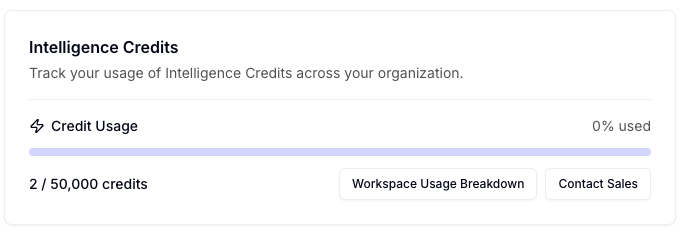
Go to Settings → Organization Settings to see your Intelligence Credits Meter. It shows:
- Total credits consumed vs. your organization's total available (e.g. 33,420 / 50,000)
- A visual progress bar reflecting current usage
- A Workspace Usage Breakdown button that exports a CSV showing credit consumption per workspace — useful for org owners managing multiple workspaces
Credit limits by plan
| Plan | Intelligence Credits |
|---|---|
| Enterprise | 50,000 (default) — configured by your SoterAI account team |
| Starter | Not currently available |
Notifications
SoterAI will alert you automatically as you approach your limit:
- 90% used — Org Owner receives an in-app notification. Contact your SoterAI representative to discuss additional credits.
- 100% used — Org Owner receives an in-app notification that all credits are consumed. New Risk Intelligence uploads will be paused until additional credits are arranged.
- Credits exhausted (user-level) — Individual users attempting to upload to Risk Intelligence will see a notification that uploads are currently unavailable.
To arrange additional credits, click the button Contact Sales or contact your SoterAI representative.
Was this article helpful?