
Using Risk Intelligence
This article shows you how to work with SoterAI’s Risk Intelligence layer—filtering, exploring, and acting on dynamic risk scenarios—both in the dashboard and via our agentic AI tools.
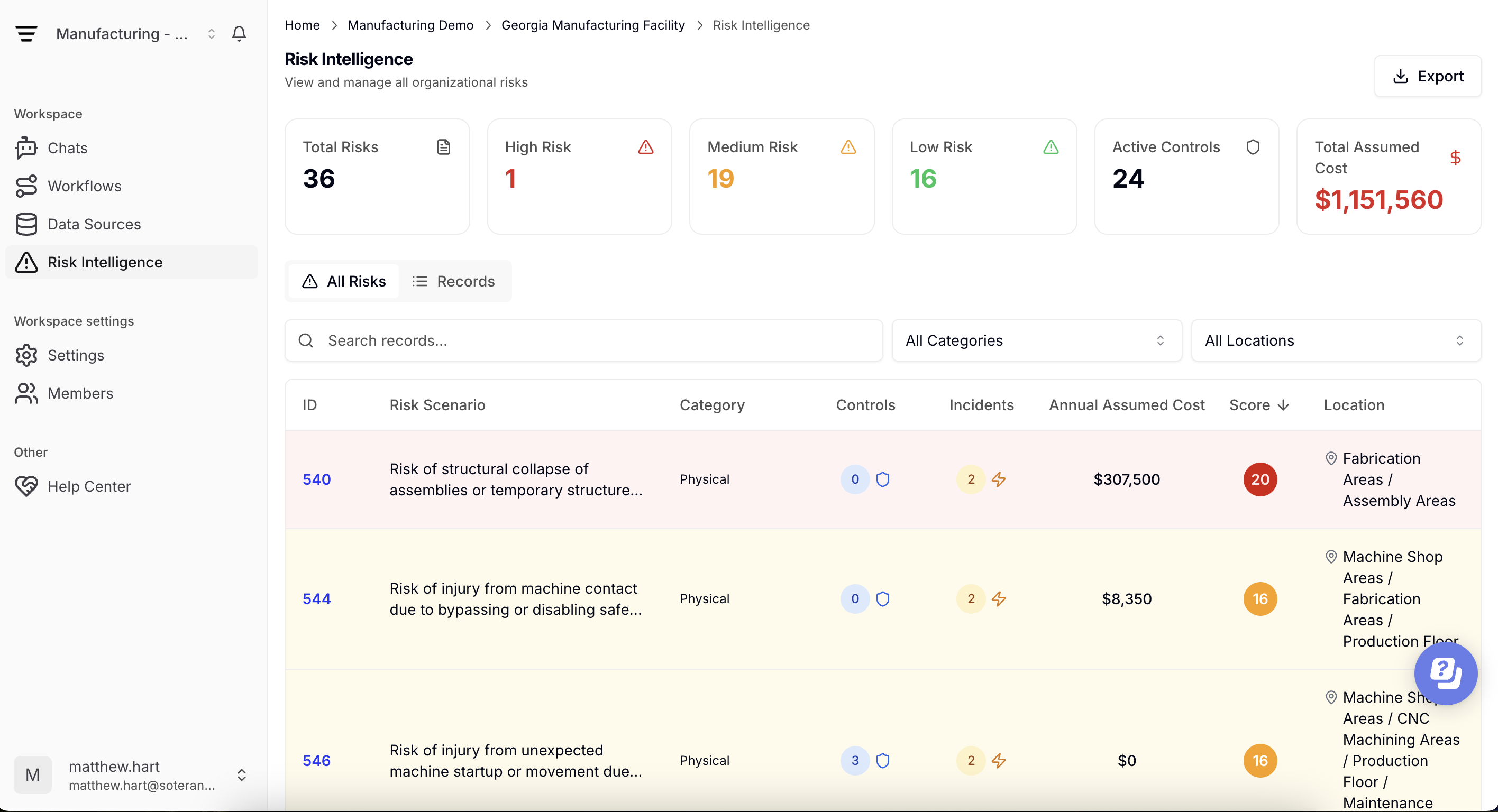
Accessing the Risk Intelligence Screen
Go to Risk Intelligence in the left navigation.
The main view displays:
- Top Risk Scenarios: “Next Incident Likely To…” ranked by combined likelihood × severity
- Risk Trends: charts of incident counts, control gaps, and risk score distributions over time
- Control Effectiveness: summary of which controls are in place versus missing or disabled
Filtering & Sorting Scenarios
Use the toolbar to refine your view:
- By Location or Site: isolate one facility or compare multiple areas
- By Hazard Type: focus on specific risk categories (e.g. chemical, ergonomic)
- By Control Status: show scenarios where required controls are missing or inactive
- By Date Range: view emerging risks over the past week, month, or quarter
Combine filters to hone in on the most relevant scenarios for your team.
Exploring Scenario Details
Click a scenario to open its detail panel:
- Underlying Data: see the incidents, hazards, and controls that contributed to this scenario, with links back to the source documents in Data Sources.
- Risk Score Breakdown: review how frequency, severity, and control effectiveness combine into the overall score.
- Recommended Actions: ask in the chat what actions are recommended to reduce risk exposure level
Exporting & Sharing
- Download scenario lists or full detail reports as XLSX or CSV
- Share direct dashboard links with colleagues (respecting their role permissions).
Agentic AI Integration
SoterAI’s agentic system can reference Risk Intelligence scenarios directly in both chat and workflows:
In Chat:
- “What’s the highest‑risk scenario at Site A this month?”
- “Summarize all scenarios missing fire‑suppression controls.”
In Workflows:
- Automated pre-loading of top control gaps into a corrective-action workflow
- Triggering inspection or reporting workflows based on scenario thresholds
This integration ensures you move seamlessly from insight to action without manual data handoffs.
Best Practices
- Weekly Reviews: Make a quick scan of top scenarios part of your routine.
- Collaborative Actions: Assign scenario follow-up tasks directly from the detail panel to team members.
- Monitor Trends: Use the Risk Trends charts to spot shifts in hazard profiles or control effectiveness over time.
By mastering the Using Risk Intelligence screen and leveraging its integration with chat and workflows, you can prioritize and address the most pressing safety risks—keeping your organization one step ahead of potential incidents.
Was this article helpful?